Tabs Outliner
Are you tired of having countless tabs cluttering your browser and hindering your workflow? Look no further than Tabs Outliner, a powerful Chrome extension designed to revolutionize the way you manage your tabs. With an impressive rating of 4.53 out of 5, Tabs Outliner has garnered a loyal following of satisfied users who swear by its efficiency and convenience.
Comprehensive Tab Management and Organization
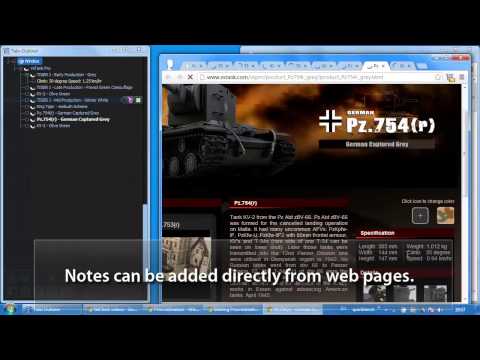
Tabs Outliner is not just a run-of-the-mill tab manager; it's a comprehensive fusion of a tab manager, session manager, and personal information organizer. It offers a complete overview of all your open and saved tabs and windows, along with the ability to add custom notes and marks to each item. This feature alone sets Tabs Outliner apart from its competitors, as it allows users to easily organize their tabs in logical hierarchies and delimited groups. The flexible and fully editable drag-and-drop tree interface makes it a breeze to prioritize and categorize your tabs according to their importance or urgency.
Effortless Tab Closure and Saving
One of the standout features of Tabs Outliner is its ability to close and save tabs in their original context with just one click. This feature is invaluable for reducing tab clutter and freeing up system resources without losing track of important information. Saved tabs seamlessly integrate with open tabs, making it easy to access and manage them in the same way as active tabs. Unlike other tab management tools that save everything in separate lists, Tabs Outliner keeps your saved tabs in focus, ensuring that you never lose sight of them.
Innovative Outlining and Organizing Features
Tabs Outliner also offers innovative outlining and organizing features that enhance your productivity. You can annotate windows and tabs, add comments, summaries, and to-do items directly in the tree. The Tree Style Tab feature, inspired by the famous Firefox plugin, creates a visual representation of the relationships between tabs, providing a strong context for all your browsing activities.
Crash Resistance and Restore
One of the most frustrating aspects of using a browser is dealing with crashed sessions. Fortunately, Tabs Outliner has a crash resistance and restore feature that saves you from the headache of losing all your tabs after a crash. You can selectively reopen only the windows and tabs you need, without consuming unnecessary resources. The extension seamlessly restores your tabs in their original context, saving you time and frustration.
Collaboration and Organization Made Easy
Tabs Outliner goes beyond tab management by offering features to enhance collaboration and organization. You can easily export and share your annotated tabs list via Google Docs, Word, Evernote, email, or messenger, making it effortless to collaborate with colleagues or share research findings. The extension also enables one-click procrastination stoppage, allowing you to close and save all currently open windows and tabs with one click, regaining your focus and PC responsiveness.
Additional Paid Features
While Tabs Outliner offers an impressive range of features for free, there are additional paid features available to support the project and enhance your user experience. For a small one-time payment of $14.95, users can enjoy keyboard shortcuts and clipboard support, frequent local backups, and automatic daily backups to Google Drive. These optional features provide advanced functionality and peace of mind for pro users who rely heavily on Tabs Outliner for their workflow.
Conclusion
If you're looking to take control of your tab chaos and boost your productivity, Tabs Outliner is the ultimate Chrome extension for you. Its impressive features, positive user feedback, and high rating make it a must-have tool for business professionals, students, and anyone seeking to streamline their browsing experience. Say goodbye to tab overload and hello to a more organized and efficient workflow with Tabs Outliner.















30 Reviews For This Extension
? It is a great addon! ? But, unfortunately, the license is bound to the Google Chrome Account. ? I use multiple google chrome accounts (private, work, and one for each private NPO-Projects) and I would pay 15$ / year so that I can add multiple google chrome accounts, ? but I don't like to pay one licence for each google chrome account.
No contact with Author. Missing/Deleted tabs.
Worked for awhile then randomly deleted everything. Tried to get my tabs back, but nothing worked. I wish I had just used bookmarks instead, this thing is horrible.
Open/closed nodes in an open backup (choose file) can't be closed/opened. Also automatic local backups are not created in the paid version. And Google Drive backups are created once every two days, not once a day.
Warning: If you change your Google account's email prefix, the paid features of Tabs Outliner get disabled. I have emailed the developer multiple times requesting a fix for this issue, but I have never received any response.
Truly solid extension until you need to change your Google account. You have to be logged in to the specific Google account you bought it with in order to use Premium - and only with the Chrome browser on that account. Tried contacting dev back in 2023 to no response so I'm basically SOL :( There's a promising extension called BrainTool that came out recently with a more modern interface, better privacy, and a responsive dev. Looks like I'm making the switch.
Please fix the Expand All Collapsed Nodes feature! It's super important for being able to search tabs that I have collapsed, in some cases, years ago. I've been using Tabs Outliner for many years. I have primarily used it on Brave, though, so I have never been able to get the paid version. That being said, the free version has a ton of functionality. Given the lack of development, I would have switched to something else, but I can't find anything that works as well as this. All the other extensions I've tried are too visually busy/bloated or missing some critical functionality. And many just fail from a usability perspective. Extra unnecessary clicks to do things that Tabs Outliner makes easy. Tabs Outliner has it right. Compact and efficient. I see the developer made a change back in April 2026. It must have fixed a bug that I never experienced because I don't notice any difference. I hope things start improving. ?
I see an update in April. If this extension is back from the dead I'll pay for it again if required. But can the author please update the description so that users know this is back in action before paying
for those experiencing blank window had the unfortunate pc crash, and when re opening chrome, tabs outliner has a blank window. - tried turning off the extension and on. still blank - tried restarting chrome. still blank i think theres an issue with the database, since theres a popup that states i cannot backup when opening the tabs outliner window for the first time. my working troubleshooting: (unfortunately i think this may only work for paying customer) if you have google drive backups, just uninstal the tabs outliner extension, and reinstall. - check your email, search for 'tabs outliner', there should be a link if you purchased it, granting access to paid feature agaiin - authorize google email and drive acess from tabs outliner - there should be backups recovered in the backup tabs, press view on the latest one - drag the top node to your tabs outliner window, and voila, you're back.. you may lose couple hours of tabs, since the auto backup is once a day if you're not a paid customer, you need to export the tree, which unfortunately i cannot do when i had the error. maybe dev will fix this later, idk. But i'm reporting and saving this for future reminder
Still the BEST thing out there as of May 2026. Like many other reviewers, I experienced a BLANK screen when opening the tabviewer window, even after the most recent update to 1.4.167_0. I went back and forth with chat GPT giving it screenshots, turning on developer mode, trying to catch errors. The final fix, was I went to %LOCALAPPDATA%\Google\Chrome\User Data\Default\Extensions\eggkanocgddhmamlbiijnphhppkpkmkl\ and found 1.4.167_0 and opened background.js and then I tried to make a change to the code and saved it. When I came back to my chrome extensions, chrome://extensions/ it warned me that the files were damaged and would allow me only two options... Remove or Repair. I clicked repair (After backing up data in that folder above, and in %LOCALAPPDATA%\Google\Chrome\User Data\Default\IndexedDB\chrome-extension_eggkanocgddhmamlbiijnphhppkpkmkl_0.indexeddb.leveldb to another folder.) Instantly, my tabs outliner was working again. I turned off developer mode and everything is working wonderfully again. Wish it would have "fixed itself" after the update but it didn't. Maybe I could have uninstalled it and reinstalled it to create the same effect? The DOWNSIDE - archived closed tabs and "crashed windows" reports from my history aren't there anymore... but at least the outliner is working again, and I can reclaim my chrome memory.
Really helpful app. it may not be the most understandable at first, but when you get used to it, it's impossible to do without it.
If your working i a workspace that needs managing 500+ tabs.... THIS IS A GODS TOOL!!!!!! For me was a 3 month learning curve.....BUT DAMNNNNN CANT IMAGNE A MORE POWERFULL TOOL THEN THIS!!!!!!!! DEVELOPER???Please don't drop out and keep this alive I will but premium 5 more times just don't let this project die.....Tried every SINGLE alternative out there, this is the BOMB!
hope can support chrome tab groups
I can't re-open my tabs or window with double click. This is one of the basic functions I need and it doesn't work. Sometimes it would but I couldn't figure if I had to have the cursor positioned a specific location or what the trick was. Led to cursing at the computer and that's unnacceptable. Holding Ctrl or Shift didn't work either. Really disappointing because the organization options are great.
DO NOT GET THIS EXTENSION! It no longer works and all those saved tabs over the years appear to be gone. DO NOT WASTE YOUR TIME!
Sadly, this extension is no longer maintained. The author is in Ukraine, as I understand it, and thus I'm sure this is VERY low on their current priority list. It is an incredible tool! Unfortunately, more recent updates to Chromium (I use Brave) have broken much of the interface and have, in some cases, resulted in a total loss of tabs. I wish I'd known that I could recover the JSON, as another reviewer described! What I am doing, however, is slowly working on a local copy of the extension where I "fix" the most broken bits and enable both the ability to actually buy it (which I've been trying to do for years, lol) and the connection to Google Drive for backups. If I can get it fairly stable, I may post it to the store as a fan update.
No longer works and this extension doesn't seem to be maintained by the dev anymore. I had saved thousands of tabs and the UI is just a blank page now. There doesn't seem to be a way to restore the saved pages. Don't get this extension unless you are prepared to lose everything you saved.
This has been, and still is for me, a great app. For those of you wondering where the developer is, he is from Ukraine. I haven't seen a post from him in a very long time
UI looks like a 90s website and most of the useful features are locked behind a paywall.
I have always told everyone to use Tabs Outliner, I cannot even recall how long I've used it. I can't recommend it enough. please donate so it doesn't go away! (I am not affiliated with, nor even know who the author is.) If you have never used it before, the short version is that Chrome retains every tab you have open when you close a window without closing the tabs one by one, or reboot with chrome running. Tabs Outliner allows you to see that "cache" of webpages, rename them, organize them, close them and reopen them later and even move them to different chrome windows. Some of this functionality is built into chrome, but this extension puts it all in one web page to easily view every page you have open and manage them as a group or separately. With everything that can be done in a web page now, effective utilization of Tabs Outliner will allow you to manage your open (and closed) webpages to minimize performance issues and optimize your time, by removing tabs you don't need now. but keeping them ready to be reopened exactly as they were when you need them.
I paid for this extension, because I loved it. Sadly, it's currently broken, and seems unmaintained. When I click on the Tabs Outliner (TO) icon in the toolbar, the window appears empty, apart from the TO icons at the bottom.
tldr; extension is mostly abandoned at this point, but you can recover your saved data in full Unfortunately, it seems like neglect is preventing this extension from being truly the greatest extension. The extension has mostly been coasting for years on being a great tool and hasn't made any serious evolutions since. If it hasn't reached you yet, the more recent chrome updates effectively breaks this extension completely and I have no confidence this will be fixed. Apparently in my case, slowly features (such as local backups and Google drive backups) have been failing. Last drive backup goes back a year, local backup ~6 months... so it seems all is lost and the UI still doesn't load up. Looking at the extension code, it looks like it was refactored for manifest v3, but it's unclear to me how the update broke it. I'd suggest looking for other ways to manage your tabs from now on. With that said, if you are a current user and need to recover your tabs, the backups are a good start, but depending on when it broke for you, it might not be current. You can however recover the tree state as json and you can pick through that. Fortunately it will be in local storage under the key: onViewClose_lastSessionSnapshot 1. Open the extension (it will be blank) 2. Press F12 to open devtools 3. In the console tab, make sure the context (the dropdown on the top left) is set to "top" 4. Enter the command: console.log(localStorage.getItem('onViewClose_lastSessionSnapshot')) This will dump the json (which should be significantly large) to the console which you can copy to file and recover your data.
It has a very good data model even though the UI looks clunky. If the developer teams with a UI designer and a good growth lead, this can be turned into a significant product with a ton of revenue I am sure. Only request to the developer for now is to keep it updated as chrome changes versions and code standards.
I've used Tabs Outliner every day for years. It's a fantastic way to save tabs across time & multiple devices. I use it to save state on the many different projects I'm working on at the same time. It breaks at least once a year, and the developer doesn't do a great job of communicating issues or helping folks fix things. But, I've always found a way to fix it, so if you're somewhat technical you should be able to fix it. Eventually. Probably. YMMV? Overall, I love this extension and would personally rate it 5 stars. It's buggy, and occasionally stops working, but for a reasonable one time fee it's had quite a positive impact on my life.
I've been using this extension for nearly 10 years. I paid early on supporting the develop because it is extremely useful. This vey low review is because the developer has neglected to respond to questions I have submitted for support from them, even though I can see that they viewed the emails. They are simply choosing not to support me and I find this unacceptable.
I've been using this extension for 10+ years, across multiple browsers. It's fantastic. It's not a glorified tab switcher like so many other extensions are. Tabs Outliner lets you organize tabs and windows that belong to different tasks or research topics, rename anything so you remember what it is and why you saved it, and add notes either as part of a saved tab node or directly to its own node. All of this without the "out of site, out of mind" problem that bookmarks have (or the organizational limits). Read through the options and the help section. (Something the reviewer below me clearly didn't do, since there's an option to change the single/double-click behavior along with an explanation for the default behavior). Yes, browser updates sometimes break extensions, including this one. Blame how Chrome handles local storage, and back up anything important before updating. If you can afford it, the paid version has automatic backups. If not, click the question mark in the extension window to find the help section, where there are directions for manually exporting your tab tree.
This is really janky and kinda clunky. It's a completely separate window, and one of the really annoying parts is, you have to double click on the tab you want to get it to open. I mean, it works in the most basic sense, but I get the feeling whoever made this either isn't comfortable with the tools they used to make this, or they fully lack any understanding of how or why different people might want to use tab trees. Even something as basic as integrating the window into Chrome isn't done.
I've used Tabs Outliner for a while and really appreciate its unique approach to organizing and managing tabs. The tree-style structure is incredibly helpful for keeping everything in order, especially for heavy tab users. However, it seems like the extension hasn't been updated in a while, and I’ve run into occasional bugs. Recently, I started exploring VertiTab as an alternative. It also supports tree-style tabs, but with additional features like cloud sync and automated snapshots, which have been a game-changer for me. I’d still recommend Tabs Outliner for anyone looking for an innovative way to manage tabs, but it’s worth checking out VertiTab if you’re looking for something actively maintained.
amazing! please keep it up, it's just amazing!
Not working anymore on MacOS (Sequoia)